Valuables tab

See this article for details on setting up the Valuables function
Signing the Valuable out
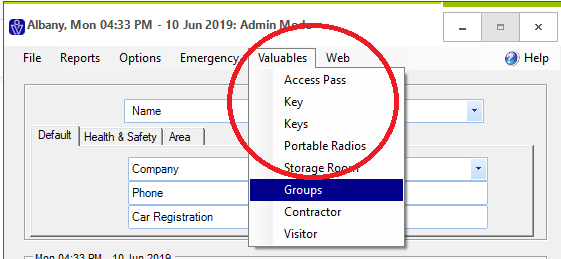
Step 1. Open VisitorRego and navigate to the Valuables tab and select a category.
Step 2. Select the item you wish to issue and select ‘Out’.

Step 3. A list of registered visitors on-site will appear. Select the individual you wish to issue the valuable to (by clicking on the arrow to the left of their name) and click ‘Issue’.

Step 4. The valuable will now be registered to the individual.

Step 5. At the VR Portal under the item information (found via the Valuables> Valuables tab, selecting the item category and then the item) a log will appear under ‘Issues’:

Step 1. Open VisitorRego and navigate to the Valuables tab and select a category.
Step 2. Select the item you wish to issue and select ‘Out’.
Step 3. A list of registered visitors on-site will appear. Select the individual you wish to issue the valuable to (by clicking on the arrow to the left of their name) and click ‘Issue’.
Step 4. The valuable will now be registered to the individual.
Step 5. At the VR Portal under the item information (found via the Valuables> Valuables tab, selecting the item category and then the item) a log will appear under ‘Issues’:
Step 6.
The Valuables> Register (In or Out) and Valuables> Issues Today+ screens will also show the issued valuable.
Valuables> Register (In or Out):

Valuables> Issues Today+:

Signing the Valuable in
Step 7. In VisitorRego navigate to the Valuables tab and select the category the item is under. Select relevant item and click the checkbox ‘In’. The valuable has now been signed in and is no longer assigned to the individual.

Note: this change will be reflected at the VR Portal
Related Articles
Valuables Tab
Valuables is a useful feature for keeping track of valuable items such a keys, access passes etc. that are given to contractors or visitors during their stay. Items are assigned to a registered visitor and signed out and in accordingly. A visitor ...Valuables Setup
Valuables is a useful feature for keeping track of valuable items such as keys, access passes etc. that are given to contractors or visitors during their stay. Items are assigned to a registered visitor and signed in and out accordingly. A visitor ...Navigating Through the VR Portal
To navigate VR Portal use the tabs at the top of the page. For a step-by-step overview of each tab and its contents, select the tab you wish to view: Register tab Contractors tab Staff tab Access tab Valuables tab My Site tabContractors Tab
Use your email address and password to login to the site https://facilities.visitorrego.com/VRF Contractors tab Clicking on the Contractors tab will present a dropdown menu with various options. Contractors> On-site This tab shows the contractors ...Staff Tab
Use your email address and password to login to the site https://facilities.visitorrego.com/VRF Staff Clicking on the Staff tab will present a dropdown menu with various options. Staff> Onsite The Staff> On-site tab displays data of the staff that ...