Reception Monitor
VisitorRego has the ability to use an extended monitor to display information from the main screen. This is helpful in busy reception areas, where a receptionist can see if a visitor is struggling to register, and can provide assistance without the need to leave the reception desk.
Previously, customers have used Mimo 7" mini USB monitors in conjunction with the reception monitor function.
You will want to have your extended monitor connected and working before enabling the function.
Enabling the Reception Monitor function
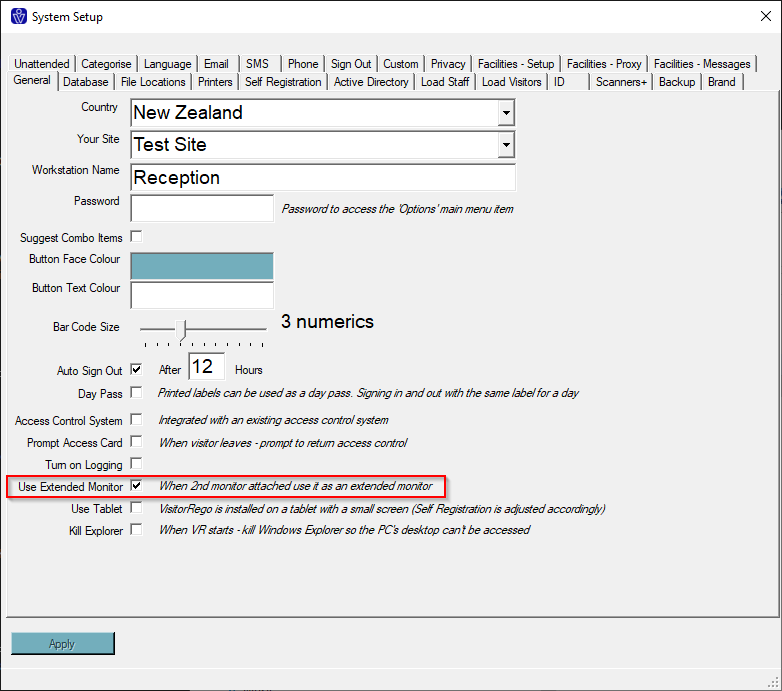
From VisitorRego's Admin mode choose Options> System Setup> General tab. Check the Use Extended Monitor box, then click Apply.
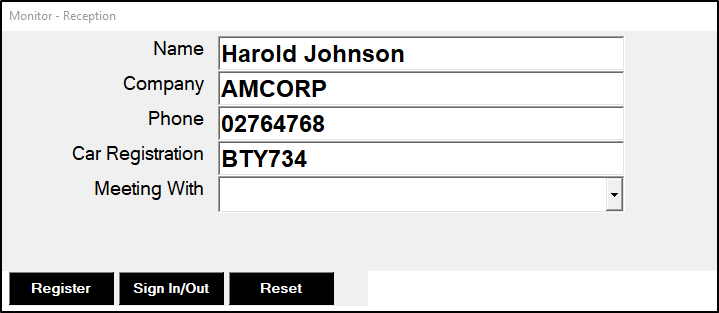
Now, when you use VisitorRego you will be able to see a video feed from the camera (if you are using one and have Photo ID switched on) and the Visitors details as they enter them on the main screen.
From VisitorRego's Admin mode choose Options> System Setup> General tab. Check the Use Extended Monitor box, then click Apply.
Now, when you use VisitorRego you will be able to see a video feed from the camera (if you are using one and have Photo ID switched on) and the Visitors details as they enter them on the main screen.
Related Articles
Reception Bell Setup (Pre V10)
This article applies to VisitorRego versions prior to V10. For information on the reception bell in V10 or higher, please refer to the knowledge base article Reception Bell - An Overview. VisitorRego can be installed in unattended reception areas and ...Staff Tab
Use your email address and password to login to the site https://facilities.visitorrego.com/VRF Staff Clicking on the Staff tab will present a dropdown menu with various options. Staff> Onsite The Staff> On-site tab displays data of the staff that ...Contractors Tab
Use your email address and password to login to the site https://facilities.visitorrego.com/VRF Contractors tab Clicking on the Contractors tab will present a dropdown menu with various options. Contractors> On-site This tab shows the contractors ...Auto Notification of a Permit/Induction/Insurance Expiring
A permit/induction/insurance can be flagged to automatically email the contractor when it is due to expire. When flagged an email is sent at 30, 15, and 0 days before expiring. Each email is generated from a template specific to the contractor and ...Certification Notification
The Certification Notification is a feature particularly useful for the induction and certification of contractors. In instances where a contractor does not sign in at a VisitorRego Appliance, they can sign in using a smart device (smart phone or ...